
How can we help you?
Find answers about verification, jobs, profiles, payments, and safety.
Verification
Secure your profile by verifying your ID. Build trust and get noticed!
View FAQAccount & Settings
Manage your profile, preferences, password, and account deletion.
View FAQMessaging & Chat
Learn how to send messages, manage conversations, and report issues.
View FAQPosting Jobs
Find help with creating and managing job postings effectively.
View FAQApplying for Jobs
Tips on applying and getting hired for care positions.
View FAQCaregiver Profiles
Create a stellar profile that attracts the right connections.
View FAQFamily Profiles
Craft a compelling profile as a care seeker to find the perfect match.
View FAQSubscriptions & Payments
Understand HeySitters payment processes, subscriptions, and billing.
View FAQSaved Items
Save your favorite caregivers or jobs for quick access later.
View FAQMy Profile Intro Video
Showcase Yourself: Learn how to upload an Intro Video on HeySitters.
View FAQSafety
Keep our community safe! Learn about guidelines and reporting tools.
View PageVerification
Account & Settings
Messaging & Chat
Posting Jobs
Applying for Jobs
Building a Standout Profile
Make a great first impression. Here are the essentials for getting hired fast.
Essentials
Foundational elements of a great profile.
- Clear profile picture
- Compelling 'About Me'
- List relevant skills
Experience
Showcase your strengths specifically.
- Detail past roles
- Certifications (CPR)
- Problem-solving approach
Trust & Safety
Show you are serious and trustworthy.
- Get ID Verified
- Provide references
- Respond promptly
Pro Tips
Little extras make a difference.
- Proofread everything
- Keep calendar updated
- Tailor to care type
Creating an Effective Profile
Attract the best caregivers by being clear and transparent about your needs.
Profile Essentials
Show you are a great family to work with.
- Family photo (optional)
- Detailed care needs
- Clear expectations
Trust & Values
Transparency finds the best fit.
- Verify your ID
- Realistic job duties
- Clear budget/rates
Communication
Respectful interaction is key.
- Respond promptly
- Be professional
- Proofread postings
How to Upload Your Intro Video
Showcase your personality to families.
Why Add an Intro Video?
Families are more likely to reach out when they can see who you are. Videos help build trust and show your personality.
🎥 Video Tips:
- ✓ Keep it under 2 minutes.
- ✓ Introduce yourself with your name and city.
- ✓ Share what kind of care you offer.
- ✓ Mention your certifications (CPR, First Aid).
- ✓ Speak clearly in a quiet, well-lit space.
Step 1: Upload to YouTube
- Go to youtube.com and log in.
- Click the camera icon (top right) and select Upload Video.
- Select your file. Give it a title like
Intro – Sam from Calgary. - Set audience to "No, it’s not made for kids".
Step 2: Set Privacy
After uploading, click Save and copy your video link.
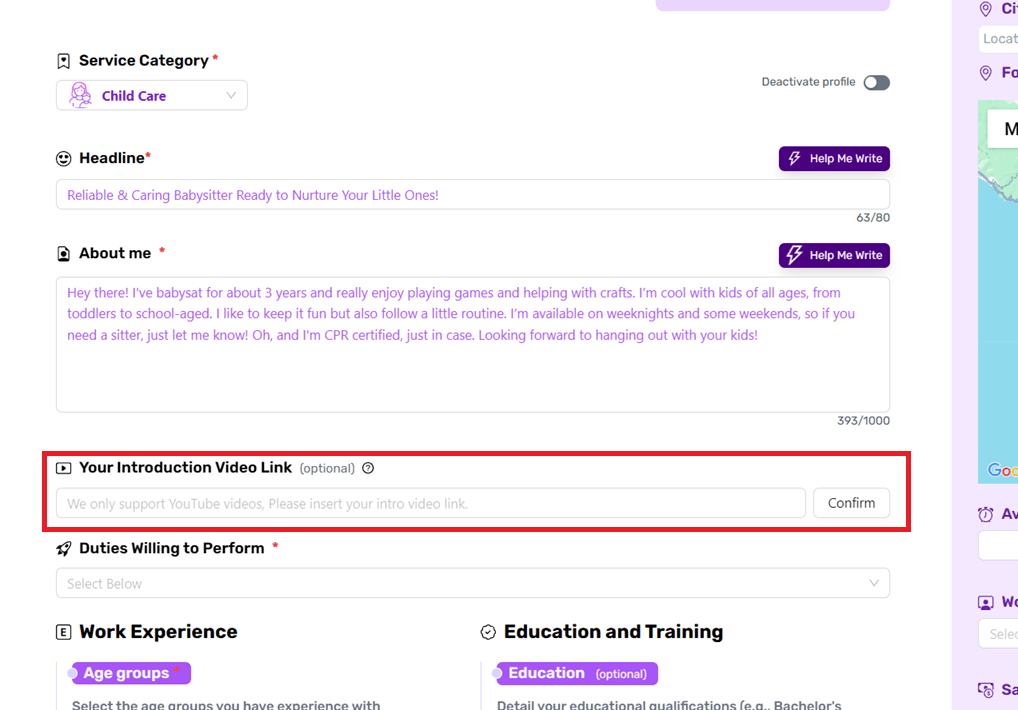
Step 3: Add to HeySitters
- Visit the "My Personal Info" or Profile Edit page.
- Find "Introduction Video" section.
- Paste your YouTube link and click Confirm/Save.
Subscriptions & Payments
Saved Items
Still need help?
Our support team is always here to assist you with any questions or issues you might have.
Contact Support